Gravity Work
Puts each piece of work that needs a person in front of the right one.
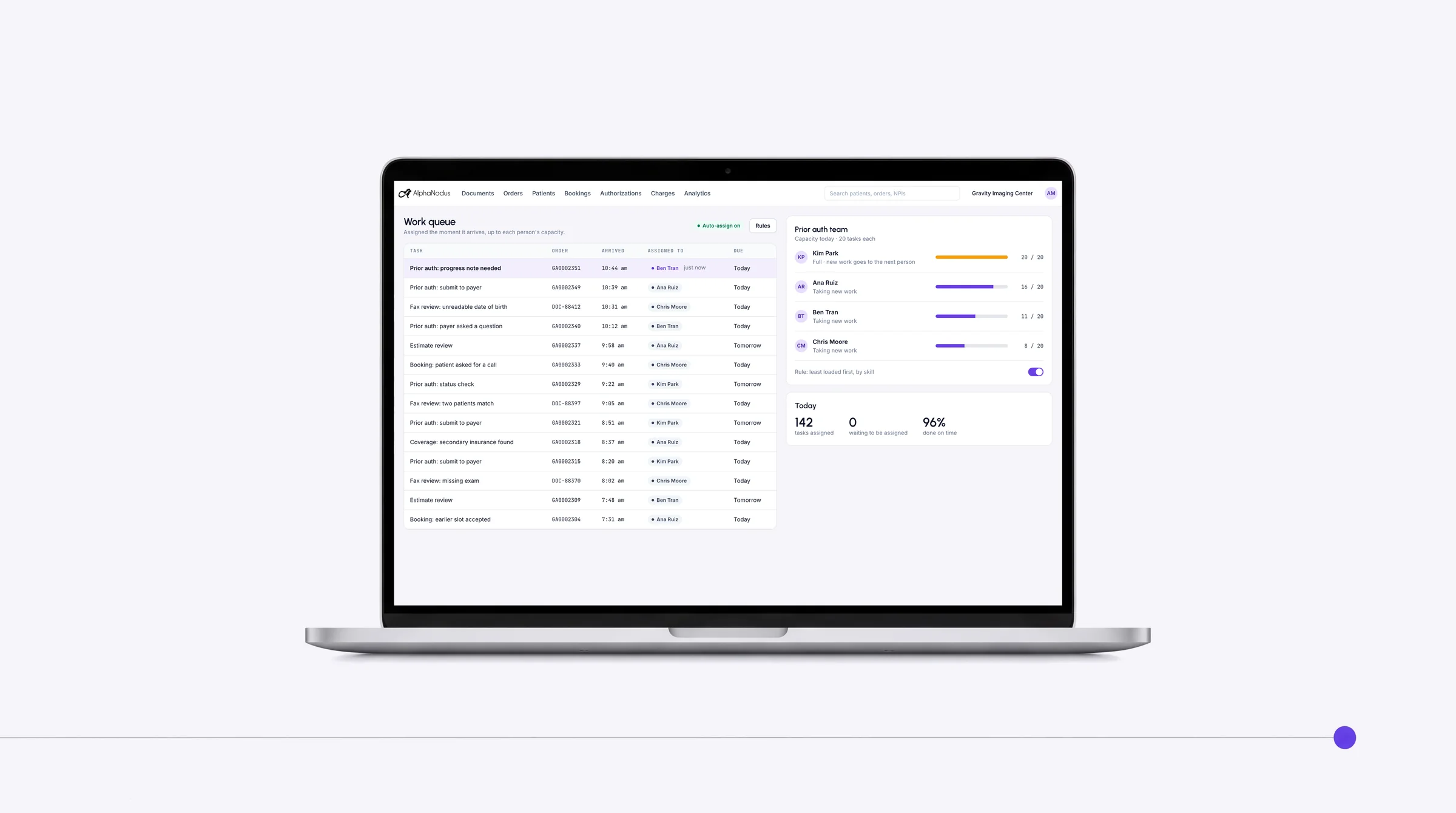
Work is assigned the moment it arrives, up to each person’s capacity and skill.
Trusted by more than 460 imaging centers across the US.
Worklists and shared tools
Imaging center worklist software for every call, document and order
Your team works from one list instead of hunting across different information systems.
Worklists
Every call, text, email, document, order, referring provider and patient on a worklist, in front of the right person, at the right time, at the right place.
Every part of Gravity has its own worklist with the same tools: the real-time worklist and the document, order, referring provider and patient worklists.
Semantic search
Search by meaning across every document, order and patient, even handwritten documents.
Every worklist has semantic search that finds work by meaning, not just exact words, including anything written on a document, even handwriting.
Tags, custom fields and shared views
Make every worklist fit how your center works: your own tags, statuses and fields, filtered and shared with the team.
Shape any worklist around the center’s own work: custom tags, statuses and fields, then filter on them and share the view with the team.
Real-time worklist
Every inbound call, text, email and web chat from patients and referring offices lands in one real-time worklist as it happens, in their language, routed to the right staff.
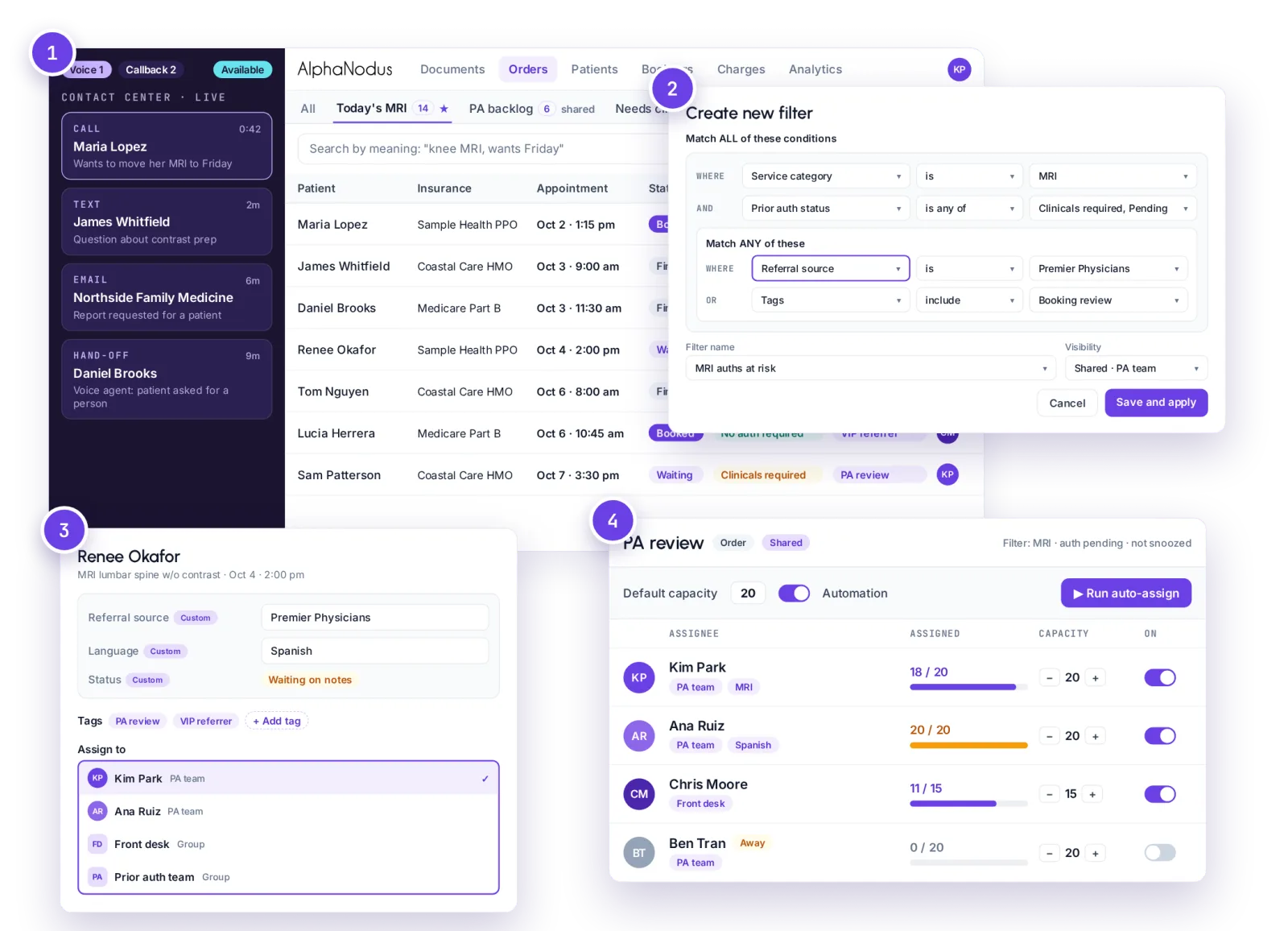
The worklists, and the tools they share
Document worklist
Every fax, email, network-folder, website and manual upload lands in one document worklist that shows where each came from.
Orders worklist
Every order in one list, with its status, exams and next step, filtered to exactly what each person should work next.
Referring providers worklist
Every referring provider and office in one list, for outreach, follow-up and relationship work.
Patients worklist
Every patient in one list, for work that belongs to the person rather than a single order.
Exceptions and agent hand-off
When an AI agent can’t finish a conversation with a patient or a referring office, a person picks it up in the real-time worklist with the whole history attached.
Comments and alerts
Staff leave comments on orders and patients and pin alerts where the next person will see them.
Presence
Shows in real time who else is viewing a document, order or other item, so two people don’t work the same one.
Previews
Open a document, order or other item in place without leaving the list.
Bulk actions
Assign, tag, set status, snooze or process many items at once, by hand or triggered by a rule.
Snooze
Hide an item until a set time, for yourself or the whole team, and it comes back on its own.
Reference notes
Locked or editable notes on payers, referring providers, devices and the center keep know-how searchable.
Column preferences
Each user picks and orders the columns on their own worklists.
Recent history
A side tab returns staff to the last items they opened.
Staff announcements
Admins post in-app notices that each user sees until they dismiss them.
In the Flow Store
Flows that hand out the work
Each flow is one task your team did by hand, now run by Gravity. Install it from the Flow Store and it runs the same day.
Gravity does it
A flow, in its mode
The flows below: work is handed out as it arrives, and redistributed when someone is out, on its own.
Your team does it
Only the exceptions
What a flow can’t finish lands on a worklist in Gravity Work, with the history attached.
An event or a schedule starts it, and fixed rules do it. Nothing to decide, so nothing to review.
Gravity Work’s flows
Auto workload distribution
Work is handed to people as it arrives, round-robin, by weight, by capacity or by skill, on any worklist.
AutomatedStartsAs work arrives on any worklist
Exceptions go to—
Auto-assignment by capacity
Admins set who a shared view’s work goes to and how much each person holds, and the system tops everyone up as work arrives.
AutomatedStartsAs work arrives, topping each person up
Exceptions go to—
Workload redistribution
When someone is out, their work is redistributed with the team: the admin clears that person’s list and it redistributes on its own to the active team, and one switch puts them back in the rotation.
AutomatedStartsWhen an admin clears an absent person’s list
Exceptions go to—
Works with
Where the work comes from
Every call, text, email and chat
Calls, texts, emails and web chat land in the real-time worklist.
Gravity CommunicationEvery document
Documents land in the document worklist, where Gravity Doc reads and classifies them and creates the order.
Gravity DocWhat a flow can’t finish
What a flow can’t finish lands on a worklist with the history attached, and Gravity Flow runs the flows that hand out the work.
Gravity FlowAgents work the order. Your people work the exceptions.
Questions
Questions about worklists and workload balancing
What is Gravity Work?
Gravity Work is where a center’s people do the work that needs a person. Every part of Gravity has its own worklist, led by the real-time worklist, where every call, text, email and web chat from patients and referring offices arrives as it happens, and the document, order, referring provider and patient worklists. What an agent can’t finish lands here with the history attached.
What happens to my team?
Gravity takes over the tasks, not the people. The routine work completes on its own, so your team can give patients the attention the paperwork used to take.
How is work assigned?
Work is assigned the moment it arrives, up to each person’s capacity and skill. Admins set who a shared view’s work goes to and how much each person holds, and Gravity tops everyone up as work arrives. A patient’s orders go to the same person, so two people don’t chase one patient.
What happens when someone is out?
When someone is out, their work is redistributed with the team. Mark them away and new work goes to the rest of the team; what they already hold stays with them until an admin clears their list, and then it redistributes on its own. When they’re back, one switch puts them in the rotation again.
Can we find a document by what’s written on it?
Yes. Every worklist has semantic search that finds work by meaning, not just exact words, including anything written on a document, even handwriting. It searches the paperwork and makes no clinical findings.
How is our data protected?
Hosted on AWS in US regions only. A HIPAA Business Associate Agreement with every customer. Every sub-processor used in Gravity has a BAA with Alpha Nodus. Independently penetration-tested every year. Data encrypted at rest with per-tenant keys. MFA on every production login, SSO on Enterprise. Controls monitored continuously, with a public Trust Center.
Trust Center