Gravity Doc
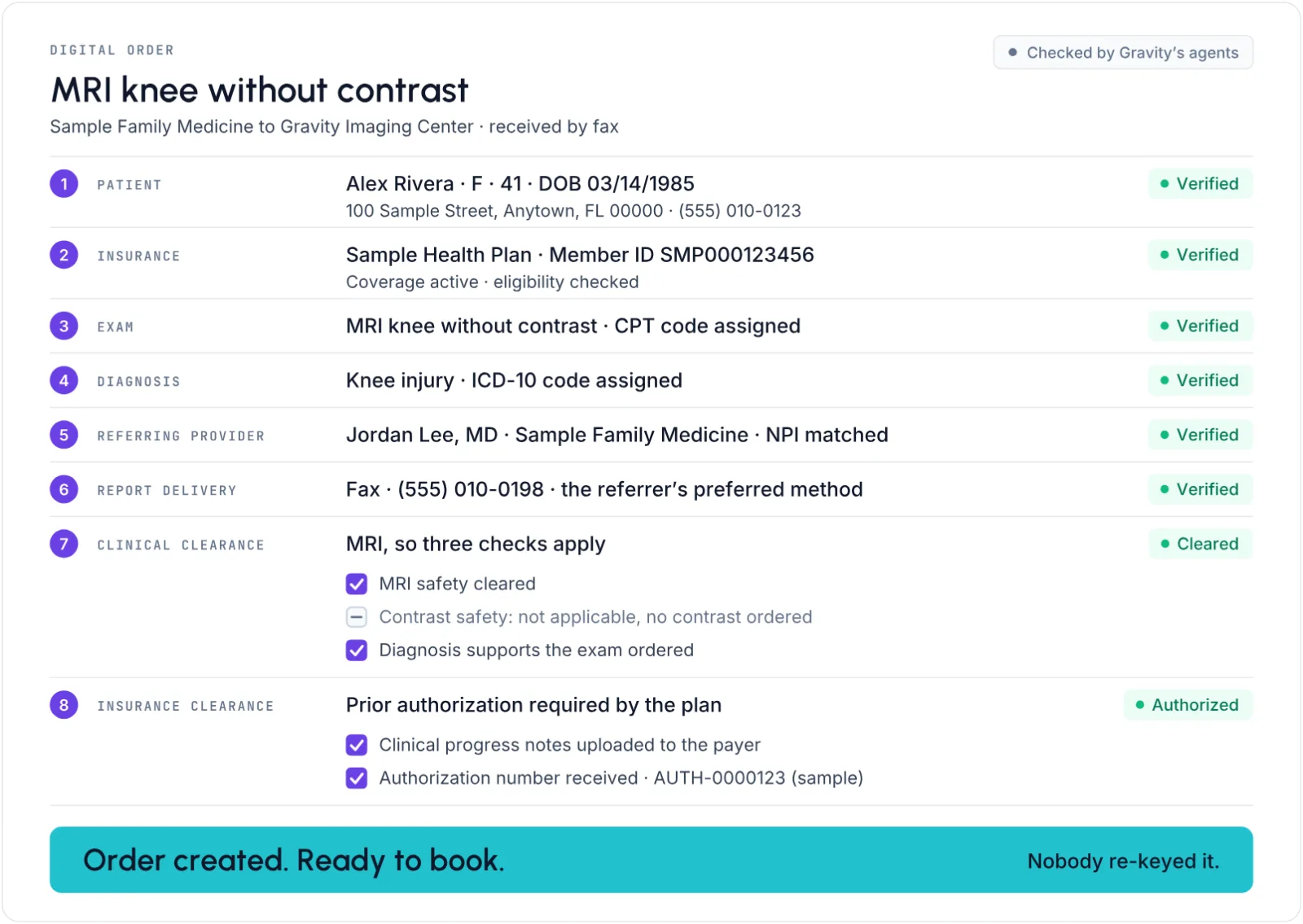
Every document is read, filed and turned into a complete order.
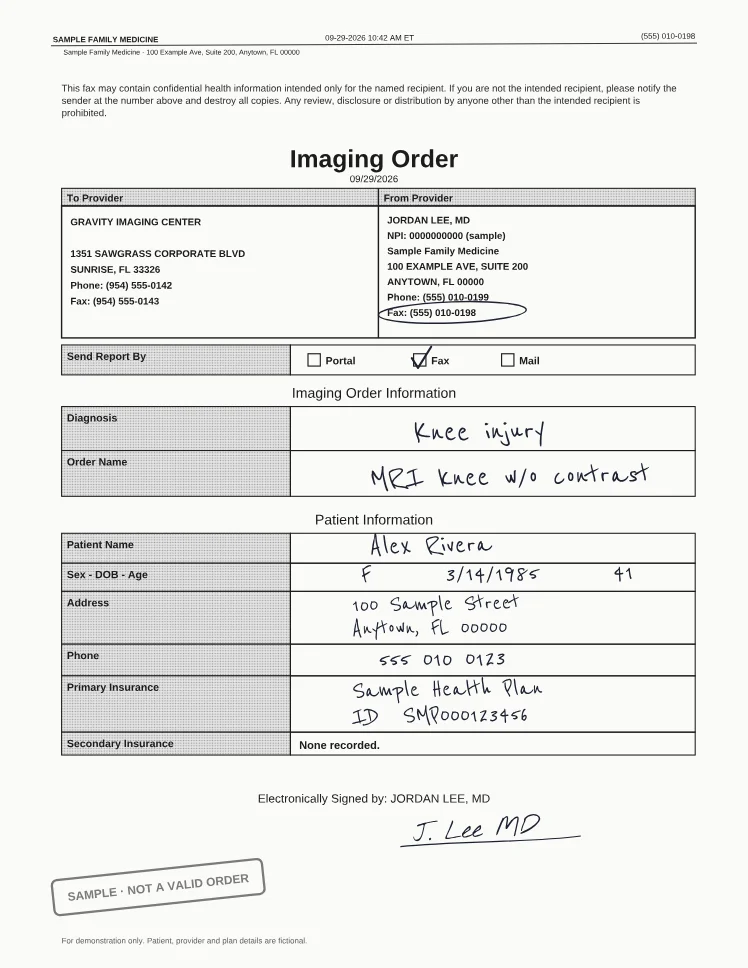
Gravity reads the fax, finds the patient (or creates one for your team to review), and creates the order.
Trusted by more than 460 imaging centers across the US.
Order intake
Automated fax intake and order entry for imaging centers
Your team reviews the work instead of re-keying it.
Draft order entry
Opens an order form already filled in from the document so staff review and confirm it instead of typing it.
Create or link and complete
A single action creates or links the order and marks the document completed, with Pending and Completed status on every document.
Split, reorder and transform documents
Split a multi-patient fax, put pages in order and fix their orientation without leaving the document.
Split multi-patient files, drag pages into order, and rotate, flip or zoom pages without leaving the viewer.
Duplicate order and patient checks
See matching orders before you create one, and merge duplicate patients in a few clicks.
Shows the patient’s matching orders before a new one is created, and merges two records for the same patient, notifying the connected RIS.
Also built in
Complete-order safeguard
An order is created automatically only when patient, provider and exam are all resolved, so incomplete or mislinked orders are not created.
Several exams on one order
One order can hold several exams, with the minimum and maximum time between them set during entry.
Order priority
Each order carries a clinical priority (Routine, Urgent, ASAP or STAT) that staff can set and filter by.
Bulk document processing
Staff select many documents and re-run extraction, tagging or assignment on all of them at once.
Ask questions about a document
Staff can chat with an AI assistant about the document open in front of them.
Document upload widget
A snippet on the center’s website lets patients and referring offices upload documents straight into the document inbox, with no login.
Order without a document
Staff can start an order from scratch for walk-ins or requests received by phone.
In the Flow Store
Flows that turn documents into orders
Each flow is one task your team did by hand, now run by Gravity. Install it from the Flow Store and it runs the same day.
Gravity does it
A flow, in its mode
The flows below: documents are read and filed, and orders created, checked and chased. Patient and order creation can wait for your team’s review.
The office does it
Through Gravity Referral
The office uploads the order once and watches it move. No mode: the office acts, not Gravity.
Your team does it
Only the exceptions
What a flow can’t finish lands on a worklist in Gravity Work, with the history attached.
An event or a schedule starts it, and fixed rules do it. Nothing to decide, so nothing to review.
An agent reads, decides and does the work. Where a flow has a review setting, you choose: Review first. Let it finish when you’re ready.
Gravity Doc’s flows
Automatic order creation
Faxed and emailed orders turn into complete orders with no typing, and anything uncertain goes to a person.
AgenticReview settingStartsWhen an order document is read
Exceptions go toDocument worklist
Automatic patient creation
When no matching patient exists, Gravity creates one for your team to review before the order goes on.
AgenticReview settingStartsWhen no matching patient is found
Exceptions go toDocument worklist
Automatic classification, indexing and linking
Every page that arrives is classified, indexed and filed on the right record, with no one touching it.
AgenticStartsWhen a document comes in
Exceptions go toDocument worklist
Order appropriateness check
As soon as an order is received, an agent checks that the exam ordered is appropriate and correct for the patient, and flags anything that isn’t for a person to resolve.
AgenticStartsAs soon as an order is received
Exceptions go toDocument worklist
Order completeness check
When an order is created, anything missing is flagged before it moves on.
AutomatedStartsWhen an order is created
Exceptions go toDocument worklist
Request a missing order
Asks the referring provider for a missing order, progress note or authorization from the order, one at a time or in bulk, and tracks each request.
AutomatedStartsWhen sent by rule
Exceptions go toDocument worklist
Also in the Flow Store, for this job
- Gravity Booking
Booking outreach
Once the order exists, the patient is texted or called to book, with a secure link straight to open slots, so the patient gets on the calendar.
AgenticStartsOnce the order exists
Exceptions go toReal-time worklist
- Gravity Estimate
Financial clearance
When an order is created, coverage, eligibility and authorization gaps are flagged before the exam, for a person to resolve.
AgenticStartsWhen an order is created
Exceptions go toOrders worklist
- Gravity Referral
Report back to the referring office
The signed report goes to the referring provider by fax on its own the moment it is signed, and again on amendment, branded and with every send on record.
AutomatedStartsWhen the report is signed, and again on amendment
Exceptions go toReferring providers worklist
Works with
Before the order and after it
What Doc couldn’t finish
Every document lands in the document worklist, where staff work only what Doc couldn’t finish.
Gravity WorkFaxes in, requests out
Faxes arrive, and missing-document requests go back out, on the center’s own number.
Gravity CommunicationThe patient books
As soon as the order is created, Booking’s outreach texts or calls the patient to book.
Gravity BookingCoverage on the new order
Estimate’s financial clearance checks coverage, eligibility and authorization on the new order.
Gravity EstimateEvery referral captured. Every report returned.
Questions
Questions about automated fax intake and order entry
What is Gravity Doc?
Gravity Doc reads every order that reaches an imaging center, by fax, email, upload or portal, sorts it into its category, finds the patient and the details it carries, and files it on the right record. Then it turns order documents into complete orders: staff key them, approve an order Gravity has drafted, or let Gravity create it.
What happens to my team?
Gravity takes over the tasks, not the people. The routine work completes on its own, so your team can give patients the attention the paperwork used to take.
How does a faxed order become an order in Gravity?
The fax lands in the document worklist. Gravity turns its pages upright, reads it, classifies it and files it on the right record. It finds the patient, or creates one for your team to review, then creates the order when the patient, referring provider and exam can all be matched with confidence. Anything uncertain goes to a person.
Can we start with draft orders?
Yes. Gravity fills in the order form from the document, and your team confirms it instead of typing it. Automatic order creation can be turned on when the team is ready.
How many orders can one person enter in a day?
One person doing order entry processes about 350 orders a day with Gravity. Documents are read, sorted and filed on their own, so that person spends the day on the orders that need them.
How is our data protected?
Hosted on AWS in US regions only. A HIPAA Business Associate Agreement with every customer. Every sub-processor used in Gravity has a BAA with Alpha Nodus. Independently penetration-tested every year. Data encrypted at rest with per-tenant keys. MFA on every production login, SSO on Enterprise. Controls monitored continuously, with a public Trust Center.
Trust Center