Gravity Developer
Any message in, any message out, on any trigger.
Every standard: HL7, FHIR, REST, GraphQL, MCP and flat files.
Gravity Developer at Iowa Radiology
- Daysto go live, not the months the practice expected
The implementation saved our practice significant time and money. What was truly remarkable was the speed; we were up and running in days rather than the months we would typically expect from a project of this scale.
Iowa Radiology's IT team and ours built the interfaces and workflows on a very short timeline. Read the Iowa Radiology story
Trusted by more than 460 imaging centers across the US.
Build on Gravity
REST, GraphQL, FHIR and HL7 APIs for imaging software
If it has an interface, Gravity can connect to it.
APIs: REST, GraphQL and FHIR
Documented REST and GraphQL APIs for every service, and FHIR to the EHRs your referrers run.
Every service has a documented REST and GraphQL API with admin-managed keys, and Gravity connects to EHR and practice-management APIs over FHIR.
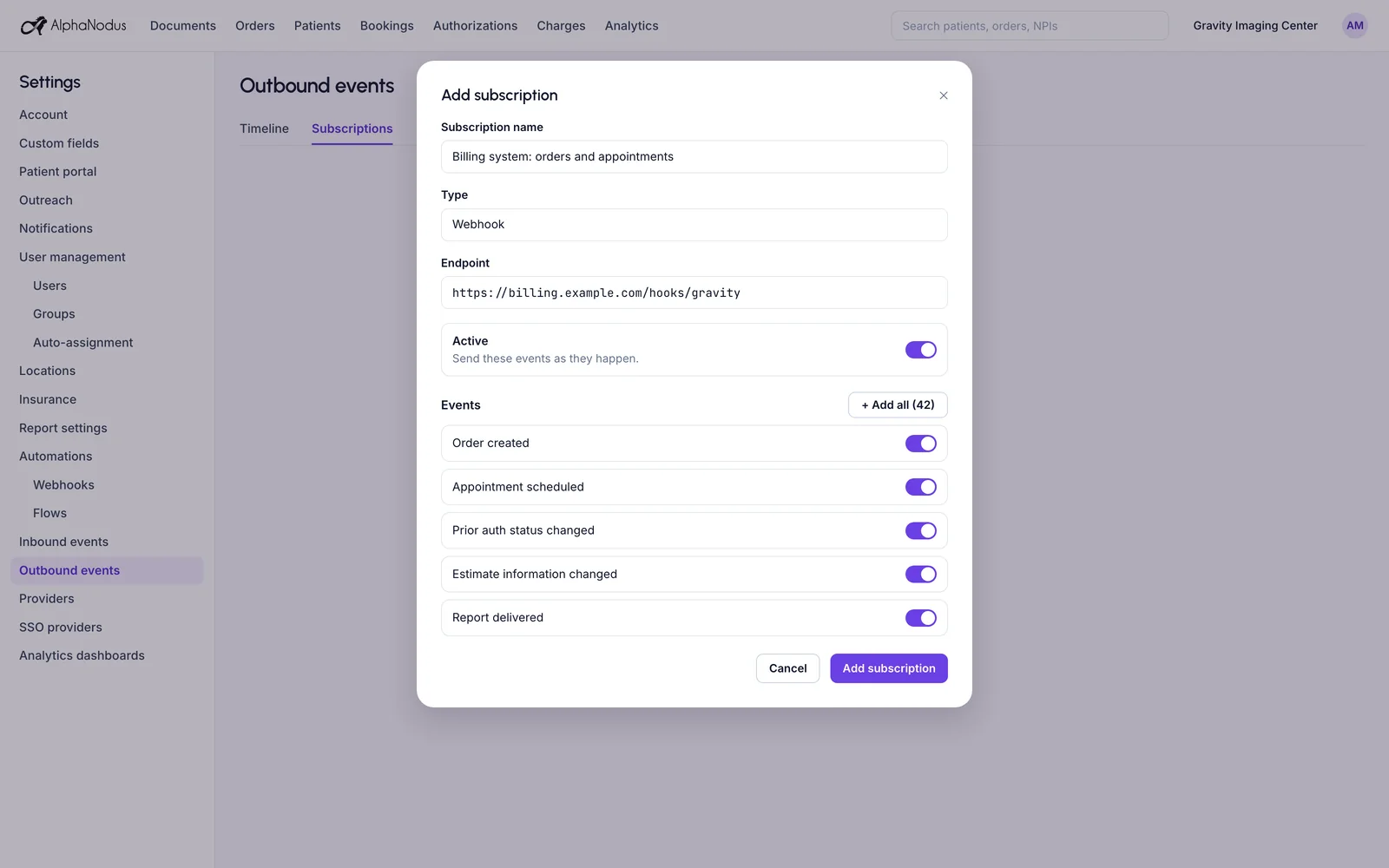
Outbound events and webhooks
Every change can reach your other systems as it happens, and you can see each connection and what it receives.
The system sends updates such as a new patient or a changed order to the center’s other systems, with a list of each connection and what it subscribes to.
AI agent connection (MCP)
AI agents connect to Gravity through MCP, with every call permission-checked.
Approved AI agents can connect to the system through a registered, permission-checked interface.
HL7 interfaces
Patients, orders, schedules and results move over standard HL7, so it can run on top of the systems you already run.
Standard HL7 messages (ADT, ORM, SIU, ORU, MFN), in and out.
Also built in
Sync profiles by record type
Each record type (patients, orders, appointments, coverage, results) gets its own direction, mode and identity rule in one sync profile.
Flat-file sync (CSV, SFTP)
Orders and other records load from a CSV upload or a scheduled SFTP file drop, and files can be sent out the same way.
Inbound message history
Admins see every message received from connected systems and how it was processed.
Results in
Signed reports arrive as HL7 results or PDFs and attach to the right order.
Updates to connected systems
Orders, appointments and insurance entered in Gravity are sent to the systems the center connects.
Browser extensions for the RIS
An extension works inside the center’s RIS and payer portals, showing status and carrying data across without re-keying.
Implementation and setup
The Alpha Nodus team configures the interfaces, numbers and settings for each center during onboarding.
Works with
From your code and your website into Gravity
Start a flow from your system
Any message your system sends can start a flow, and any event in Gravity can start one.
Gravity FlowDocuments from your website
The document upload widget: a snippet on the center’s website that sends uploads into the document inbox, with no login.
Gravity DocPatients from your website
The portal link widget: a snippet on the center’s website that gives a patient a secure link to their portal.
Gravity VisitChat from your website
The web chat widget: live chat from the center’s website into the real-time worklist in Gravity Work.
Gravity CommunicationIf the other system has an interface, Gravity can connect to it.
Questions
Questions about imaging APIs and interfaces
What is Gravity Developer?
Gravity Developer is the interface engine built into Gravity. If the other system has an interface, Gravity talks to it in the standard it speaks: HL7, FHIR, REST, GraphQL, MCP or flat files. Any change in Gravity can send a message, and any message received can start work. It can run on top of the systems you already run.
What happens to my team?
Gravity takes over the tasks, not the people. The routine work completes on its own, so your team can give patients the attention the paperwork used to take.
Can my code start a flow in Gravity?
Yes. Any message your system sends can start a flow, and any event in Gravity can start one. Install a flow from the Flow Store, set one up as an automation rule, or have the Alpha Nodus team build one for you on the same engine.
How does my system find out when something changes in Gravity?
Through outbound events and webhooks. Gravity sends updates such as a new patient or a changed order to the center’s other systems as they happen. Admins see each connection and what it subscribes to, and if a required field is missing, Gravity waits instead of sending an incomplete update.
How do I get access to a center’s Gravity?
API keys are managed by the center’s admins, and the Alpha Nodus team configures the interfaces for each center during onboarding.
How is our data protected?
Hosted on AWS in US regions only. A HIPAA Business Associate Agreement with every customer. Every sub-processor used in Gravity has a BAA with Alpha Nodus. Independently penetration-tested every year. Data encrypted at rest with per-tenant keys. MFA on every production login, SSO on Enterprise. Controls monitored continuously, with a public Trust Center.
Trust Center