Gravity Visit
The patient arrives booked, prepared, checked in and paid.
Patients book themselves from the app or by chat, or the AI voice agent books them by phone, under the same rules your booking staff follow.
Trusted by more than 460 imaging centers across the US.
On the patient’s phone
Patient portal, online check-in and intake forms for imaging centers
Every form digital, filled in once.
Patient self-booking: app, voice and chat
Patients book themselves from the app, by voice or by chat, under the same rules your booking staff follow.
Patients book, move and cancel their own exam under the center’s booking rules: in the patient app, by voice with the AI voice agent, and by web chat.
Digital health forms that remember
Every health form digital and filled in once, with every answer and signature on the order.
Every form is digital, from consents and e-signature to screening and health questionnaires, demographics, ID and insurance, and every signed copy and answer is filed to the order.
Pre check-in and pay from the phone
Most of check-in is done, and the copay paid, before the patient walks in the door.
Before the visit, patients confirm their details, answer screening questions, sign consents, upload documents and pay the copay or patient responsibility, all from one text link with no login.
Reports, images and lay letters on the phone
Lay letters, reports and images, on the patient’s phone.
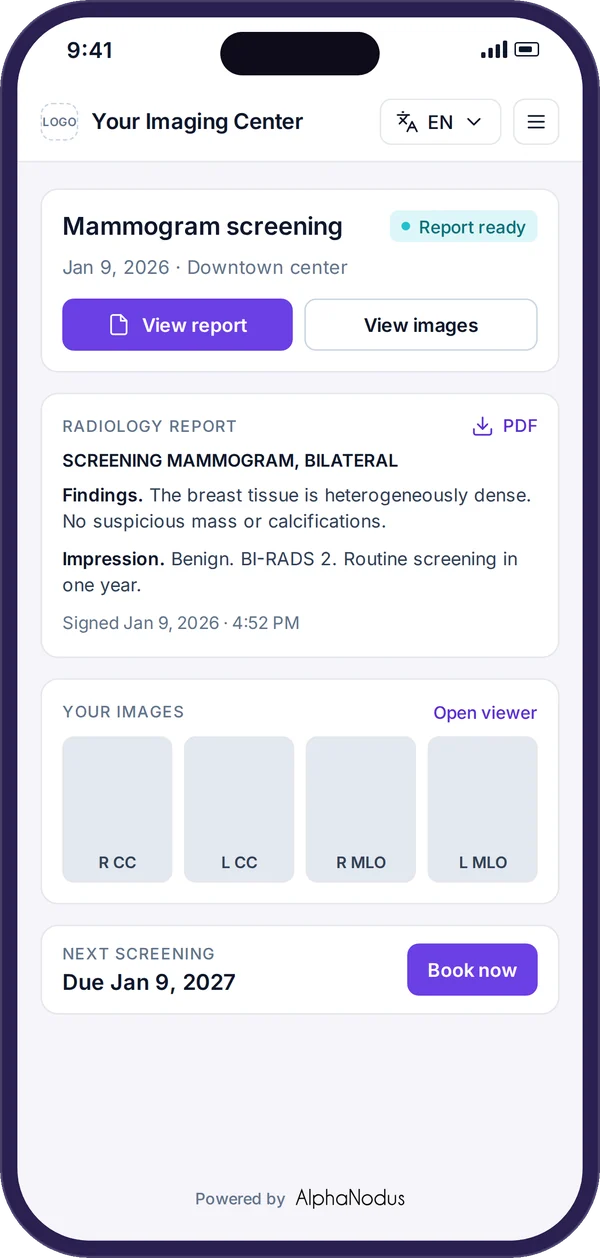
The patient opens their lay letters, reports and shared images on their phone, with every order grouped by visit: to book, to check in to or change, and past exams with results.
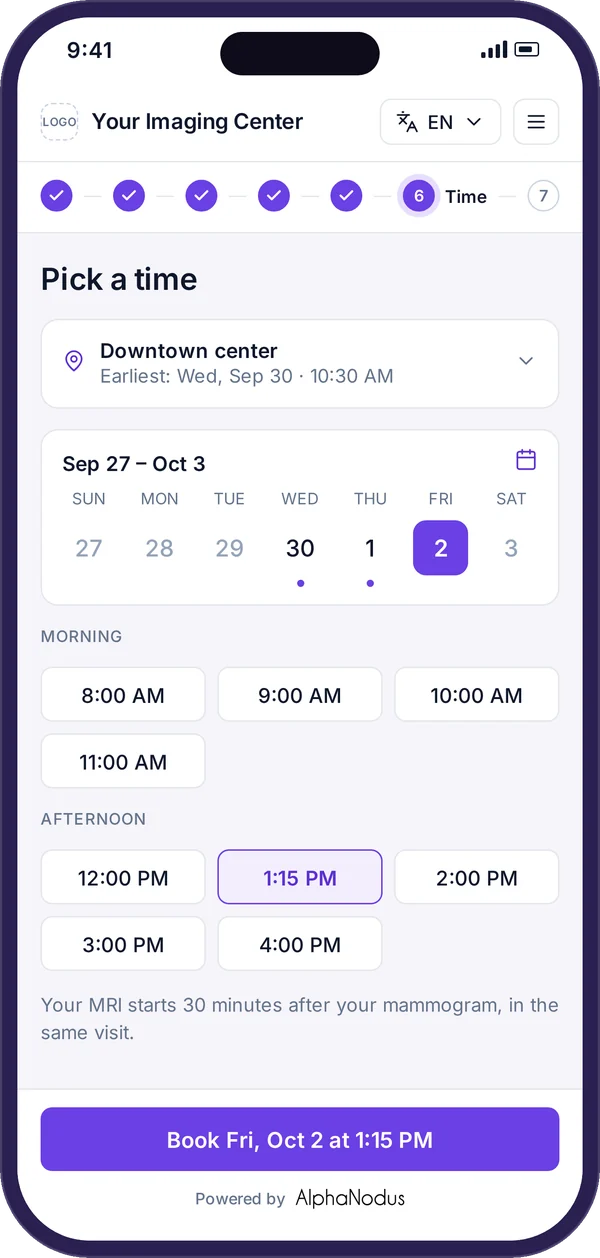
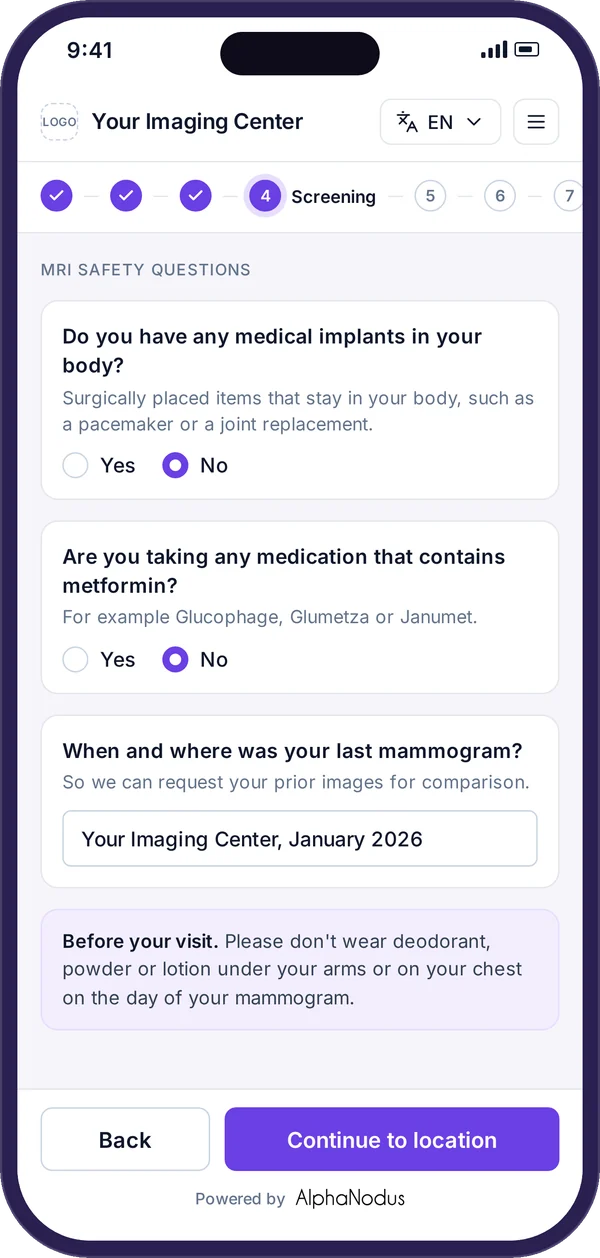
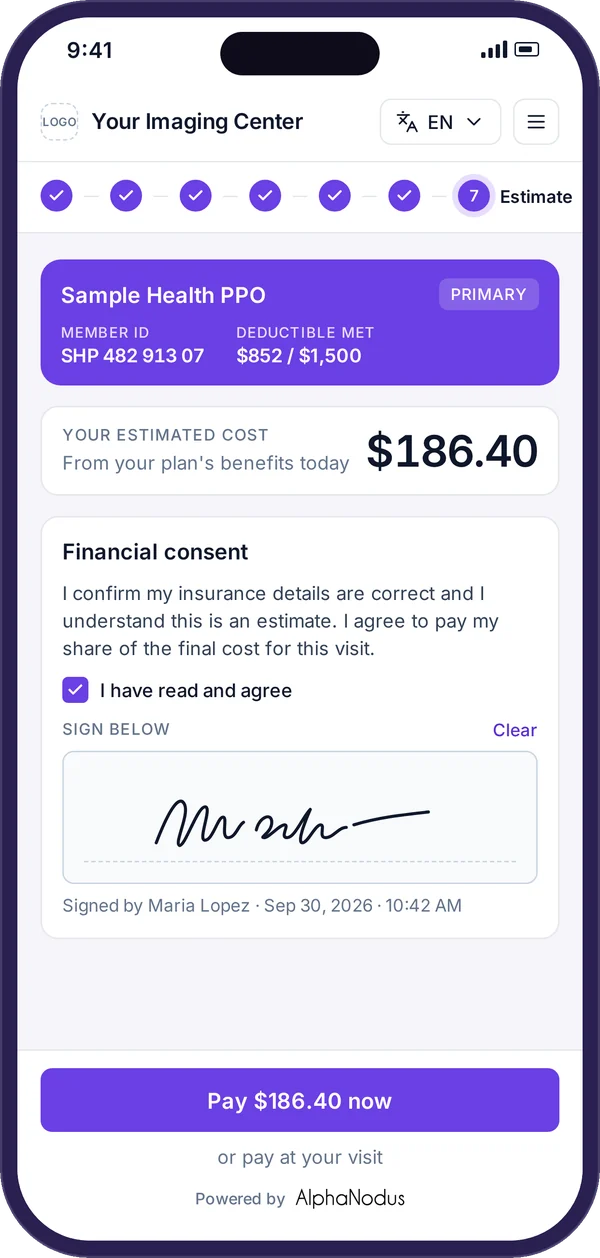
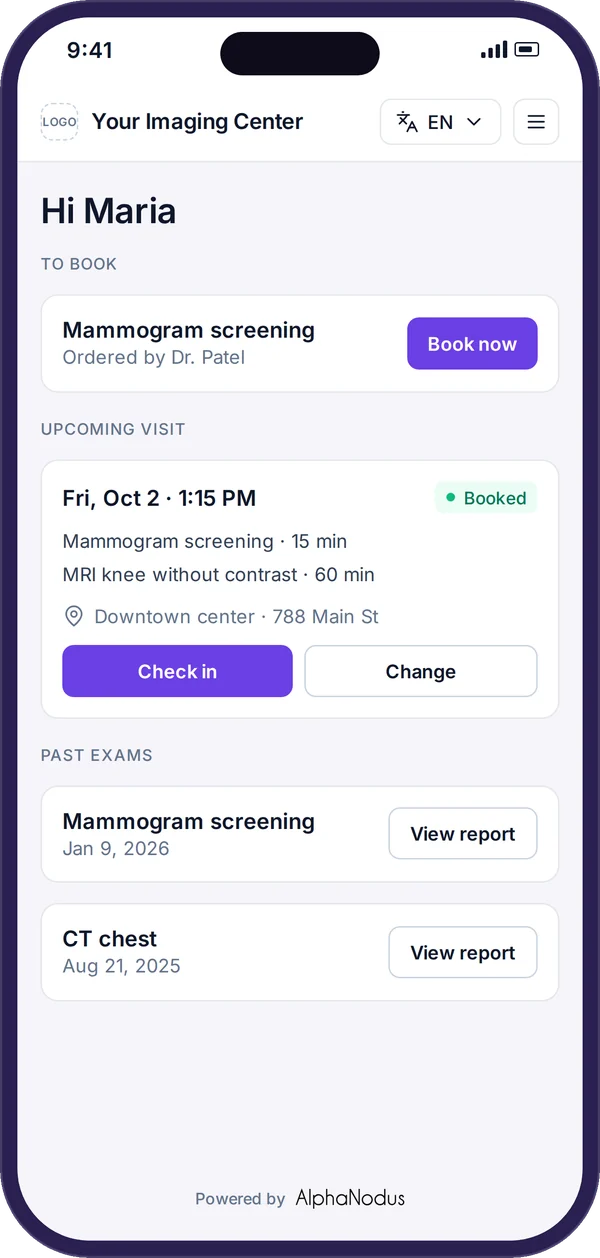
- Book
- Prep
- Estimate and pay
- Check in
- Results
Also built in
No app, no password
Patients open their portal from a secure, time-limited text link and confirm who they are with their date of birth, with lockout after repeated wrong tries.
Portal in 20 languages
Patients can switch the portal into about 20 languages, and it opens in the language saved on their record.
Consents and e-signature
Patients read and sign privacy, HIPAA and other consents on screen, and signed copies are attached to the order.
Identity check
Patients confirm their date of birth before seeing any appointment details, with lockout after repeated misses.
ID and insurance card upload
Check-in can ask for photos of ID, insurance card, referral or other documents, each required or optional.
Demographics and contact details
Patients confirm phone, email, address, sex, height and weight, and the center chooses which fields are shown or required.
Document requests to patients
Staff ask a patient to upload their ID, insurance card or referral through a secure link.
Checked-in status and packet
Finishing check-in marks the appointment checked in and files signed forms and answers to the order, optionally as a PDF.
Patient moves and cancels
Patients move or cancel their own appointment from the portal, with every exam in the visit moving together.
Your center’s words and look
Screens, messages, support phone and email, privacy links and logos are set per center so the portal reads as the center’s own.
In the Flow Store
Flows that get the patient to the visit ready
Each flow is one task your team did by hand, now run by Gravity. Install it from the Flow Store and it runs the same day.
Gravity does it
A flow, in its mode
The flows below: the voice agent’s calls, prep instructions, check-in links and results go out on their own.
The patient does it
Through Gravity Visit
The patient books, fills in the forms and checks in from their phone. No mode: the patient acts, not Gravity.
Your team does it
Only the exceptions
What a flow can’t finish lands on a worklist in Gravity Work, with the history attached.
An event or a schedule starts it, and fixed rules do it. Nothing to decide, so nothing to review.
An agent reads, decides and does the work. Where a flow has a review setting, you choose: Review first. Let it finish when you’re ready.
Gravity Visit’s flows
Self-booking by voice: AI voice agent
An AI voice agent calls patients to book new appointments, confirm and move them, reads prep instructions, asks screening questions and logs every call.
AgenticStartsWhen a patient calls, or a booking needs a call
Exceptions go toReal-time worklist
Exam prep instructions
Prep instructions linked to each exam are shared with patients automatically when they book, and read out by the voice agent.
AutomatedStartsWhen the exam is booked
Exceptions go toPatients worklist
Pre check-in and document request links
Before the visit, patients are sent a link to check in and upload the documents the center needs, on its own, ahead of the appointment.
AutomatedStartsIn the check-in window before the visit
Exceptions go toPatients worklist
Results and lay letters to the patient
When the report is signed, the patient is sent a text link to read and download it, open shared images and read their lay letter in the portal.
AutomatedStartsWhen the report is signed
Exceptions go toPatients worklist
Also in the Flow Store, for this job
- Gravity Grow
Breast tracking and recall
Reads the BI-RADS score and recommendation from the signed report, creates the follow-up order, sends the lay letter and recalls patients due for screening, on the schedule MQSA requires.
AgenticStartsWhen the report is signed
Exceptions go toDocument and patients worklists
Works with
The patient does the steps; the rest of Gravity sets them up
Booking’s rules
Every self-booking and voice-agent booking runs under Booking’s rules.
Gravity BookingThe patient’s share
The patient pays the copay or patient responsibility during pre check-in.
Gravity PayWhat the agent can’t finish
What the voice agent can’t finish lands in the real-time worklist in Gravity Work.
Gravity WorkEvery order becomes an exam. Every open slot gets a patient.
Questions
Questions about the patient portal and online check-in
What is Gravity Visit?
Gravity Visit is everything the patient does for their visit, on their own phone: book it, fill in every form once, check in and pay before they arrive, and see their results, with nothing to download and no password. Patients who would rather talk get the AI voice agent, day and night.
What happens to my team?
Gravity takes over the tasks, not the people. The routine work completes on its own, so your team can give patients the attention the paperwork used to take.
Can patients book any slot they like?
No. Patients book themselves from the app or by chat, or the AI voice agent books them by phone, under the same rules your booking staff follow, set in Gravity Booking.
What does the patient do before they arrive?
From one text link with no login, patients confirm their details, answer screening questions, sign consents, upload their ID and insurance card and pay the copay or patient responsibility. Most of check-in is done before the patient walks in the door.
What can patients see after the exam?
When the report is signed, the patient is sent a text link to read and download it, open shared images and read their lay letter in the portal. Gravity shows the report; it doesn’t read the scan or explain it.
How is our data protected?
Hosted on AWS in US regions only. A HIPAA Business Associate Agreement with every customer. Every sub-processor used in Gravity has a BAA with Alpha Nodus. Independently penetration-tested every year. Data encrypted at rest with per-tenant keys. MFA on every production login, SSO on Enterprise. Controls monitored continuously, with a public Trust Center.
Trust Center