Gravity Grow
The CRM that keeps referrers sending, and wins back the ones who stopped.
A clean, NPI-checked record of every referring provider, kept current from the national registry.
Trusted by more than 460 imaging centers across the US.
The referrer record
Referral management software for imaging centers
Know who refers, who stopped, and win them back.
Market intelligence
See every physician in your market who orders imaging, including the ones sending their orders elsewhere today, and go win them.
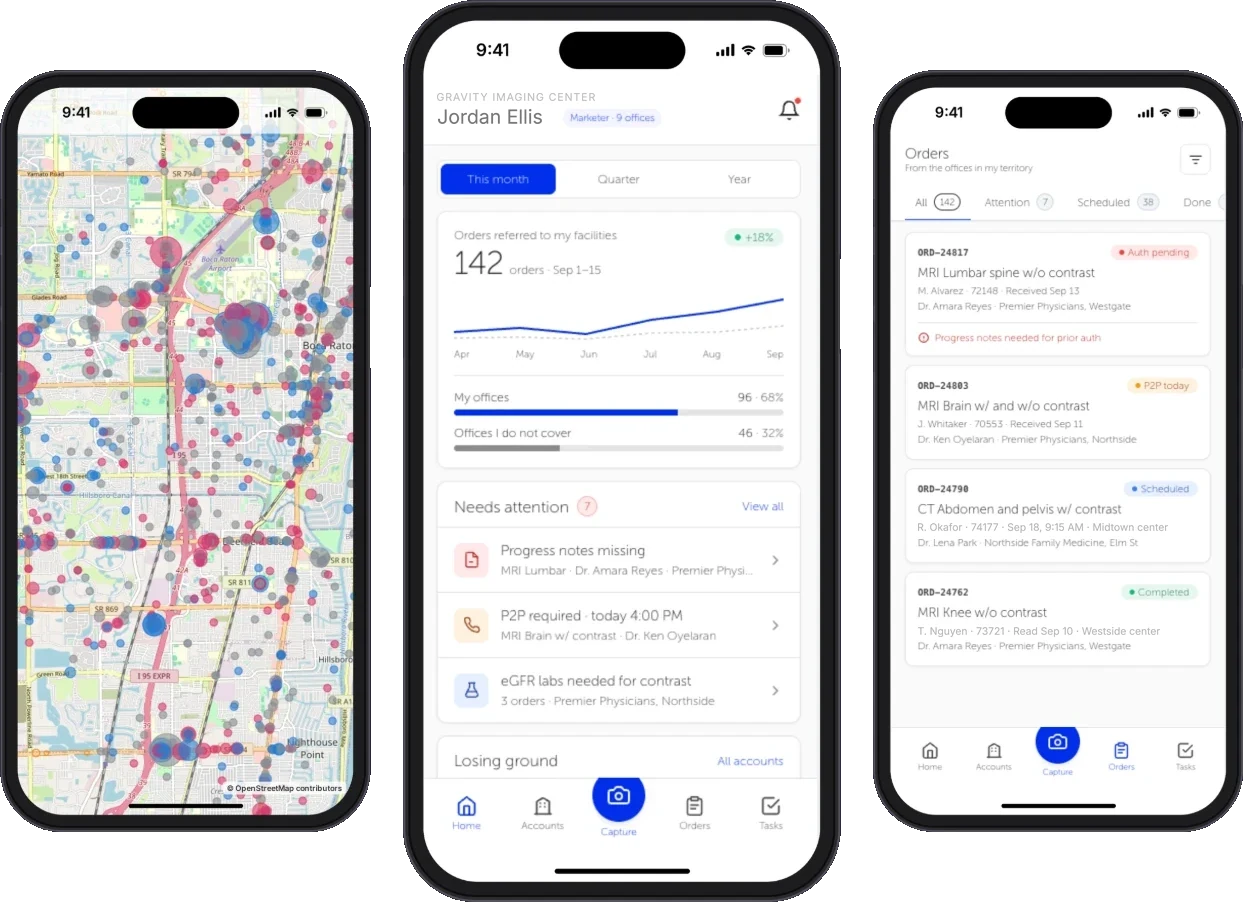
Maps every provider in your market who can order imaging, shows who refers to you and who refers elsewhere, and flags referrers whose volume is rising or falling.
Referring provider directory
Every referring physician in one clean, NPI-checked record, kept current from the national registry, with the right office, fax and contact for each.
Specialty, credentials, NPI, practice, phone, fax and email, refreshed from the national registry so orders, reports and campaigns reach the right office.
Referral history per provider
Open any referring physician and see every order they’ve sent you, and whether each one is booked, authorized or reported.
Every imaging order a provider has sent, with its status, date of service, exam and prior authorization result.
Practice locations and groups
Know which practice and office every referring physician works from, so your liaisons knock on the right door.
Each referring physician is linked to every practice location and organization they work from, so referrals and outreach follow the office as well as the physician.
Also on the record
Referrer contact preferences
Set, per referring physician, whether they may be contacted and which automatic requests they receive, so outreach respects every office’s wishes.
Outreach history per provider
Every request already sent to a referring physician’s office, with counts by type and whether each one went through.
Provider groups and saved views
Tag referring physicians by specialty, office or territory and save the filtered views your liaisons use every day.
Orders by referring provider
Filter every order by referring physician or group to see how much work each referrer sends you.
In the Flow Store
Flows that keep referrers sending
Each flow is one task your team did by hand, now run by Gravity. Install it from the Flow Store and it runs the same day.
Gravity does it
A flow, in its mode
The flows below: campaigns, recalls and the report back go out on their own.
The office does it
Through Gravity Referral
The office uploads the order once and watches it move. No mode: the office acts, not Gravity.
Your team does it
Only the exceptions
What a flow can’t finish lands on a worklist in Gravity Work, with the history attached.
An event or a schedule starts it, and fixed rules do it. Nothing to decide, so nothing to review.
An agent reads, decides and does the work. Where a flow has a review setting, you choose: Review first. Let it finish when you’re ready.
Gravity Grow’s flows
Breast tracking and recall
Reads the BI-RADS score and recommendation from the signed report, creates the follow-up order, sends the lay letter and recalls patients due for screening, on the schedule MQSA requires.
AgenticStartsWhen the report is signed
Exceptions go toDocument and patients worklists
Referrer outreach campaigns
Fax and email campaigns to referring physicians’ offices, built from the center’s own referrer data and sent on their own, on a schedule or when marketing starts them.
AutomatedStartsOn a schedule, or when marketing starts it
Exceptions go toReferring providers worklist
Also in the Flow Store, for this job
- Gravity Referral
Report back to the referring office
The signed report goes to the referring provider by fax on its own the moment it is signed, and again on amendment, branded and with every send on record.
AutomatedStartsWhen the report is signed, and again on amendment
Exceptions go toReferring providers worklist
Works with
The same referrer, across the system
The office’s side
Gravity Referral is the referring office’s view of the same referrer.
Gravity ReferralWhat an office owes
Marketers are told when a referring office owes clinical notes or an authorization, or an exam was denied.
Gravity PriorAuthEvery referral captured. Every report returned.
Questions
Questions about referral management
What is Gravity Grow?
Gravity Grow is the referral management CRM built into Gravity for imaging centers. It shows every physician in your market who orders imaging, keeps an NPI-checked record of every referring physician and every order they have sent, and runs fax and email campaigns on its own, so referrers keep sending and the ones who stopped come back.
What happens to my team?
Gravity takes over the tasks, not the people. The routine work completes on its own, so your team can give patients the attention the paperwork used to take.
We already have a CRM and liaisons. Why Grow?
Grow is the referrer record inside the system your orders already run on, so a provider’s history is the orders they actually sent, each with its status, date, service and authorization result, rather than a list someone keeps up by hand.
How do provider details stay correct?
Look a provider up in the national registry when you add them, and compare the registry’s record with yours later to update what’s changed. Every change is kept on the record’s timeline, with who made it and when.
What happens when a campaign can’t go out?
It lands on the referring providers worklist in Gravity Work, in front of the right person, with the history attached. Your team handles only the exceptions.
How is our data protected?
Hosted on AWS in US regions only. A HIPAA Business Associate Agreement with every customer. Every sub-processor used in Gravity has a BAA with Alpha Nodus. Independently penetration-tested every year. Data encrypted at rest with per-tenant keys. MFA on every production login, SSO on Enterprise. Controls monitored continuously, with a public Trust Center.
Trust Center