Meet us at RSNA 2026, booth 6537Book a working session →

How Gravity runs the order

Every step of the order, run for you.

Where the work is routine, Gravity just does it. Where it takes intelligence, reading the fax, making the call, working the portal, Gravity’s agents do it, and your people either review the work or handle the exceptions.

Agents work the order. Your people work the exceptions.

  • Agentic an agent acts end to end and hands what it can’t finish to a person
  • Automated an event or a schedule starts it, and fixed rules do it
  1. Order inDoc · Communication
  2. BookedBooking · Visit
  3. AuthorizedPriorAuth
  4. Arrives readyVisit · Estimate · Pay
  5. Report backReferral · Visit
  6. PaidCharge · Claim

The exam and the read · your RIS and PACS

Gravity does the work of the whole order, from the fax to the payment

01 · Order in

Every document is read, filed and turned into a complete order.

Information systems record the work. An AOS does the work.
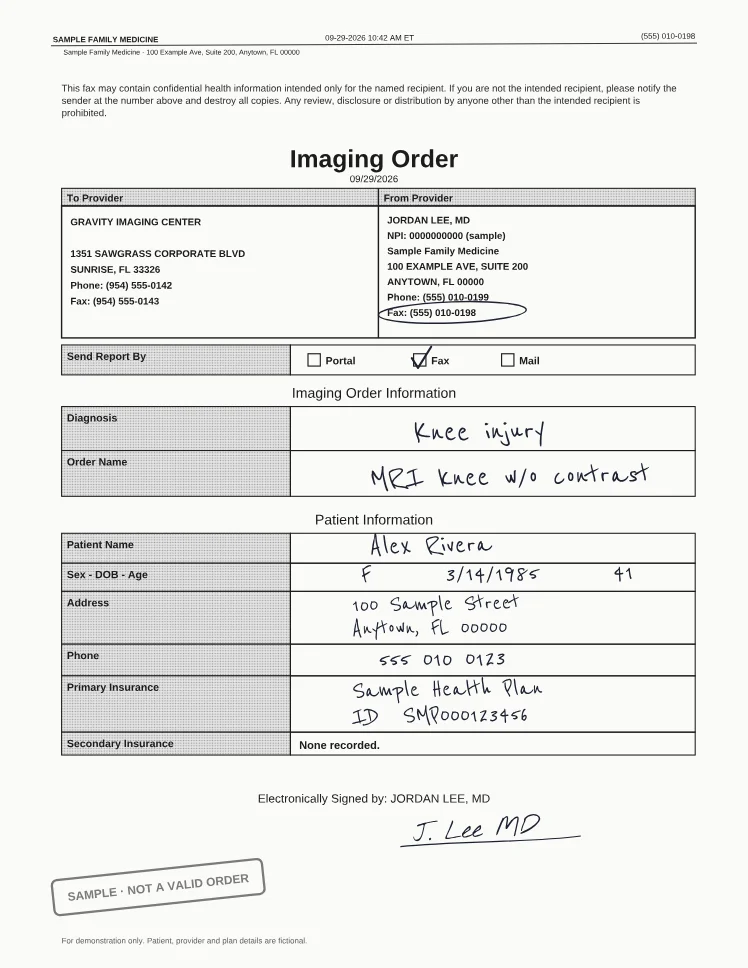
Incoming fax(555) 010-0198 · Sample Family Medicine
A handwritten, faxed imaging order for an MRI of the knee, a fictional sample marked not a valid order
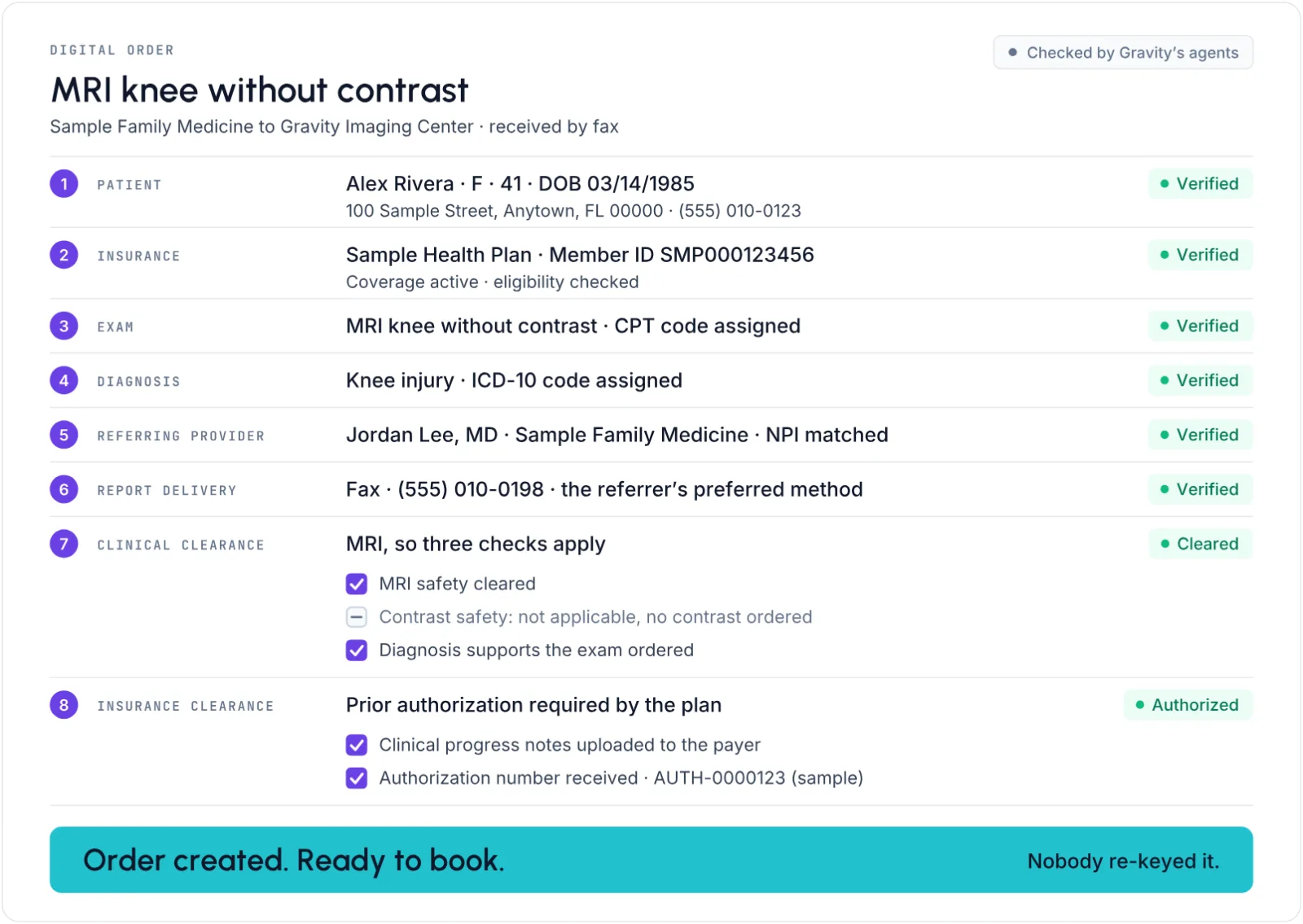
The digital order Gravity builds from the fax: patient, insurance, exam, diagnosis, referring provider and report delivery each verified, with clinical and insurance clearance
A faxed order, read and turned into a digital order
  1. 01

    It arrives, any way

    Every conversation, whatever the channel, on one timeline for the order and the patient.

    The referral coordinator uploads the order in the portal and it is read and turned into a digital order at the imaging center.

  2. 02

    An agent reads it

    Every page that arrives is classified, indexed and filed on the right record, with no one touching it.

    • Automatic classification, indexing and linking Agentic

    Gravity Doc

  3. 03

    It becomes an order

    Gravity reads the fax, finds the patient (or creates one for your team to review), and creates the order.

    An order is created automatically only when patient, provider and exam are all resolved, so incomplete or mislinked orders are not created.

    • Automatic order creation Agentic

    Gravity Doc

  4. 04

    It’s checked before it moves on

    When an order is created, anything missing is flagged before it moves on.

    • Order completeness check Automated
    • Order appropriateness check Agentic
    • Financial clearance Agentic

    Gravity Doc Gravity Estimate

  5. 05

    A person fixes the exception

    When an order is created, coverage, eligibility and authorization gaps are flagged before the exam, for a person to resolve.

    Coverage and authorization are fixed before the exam, not discovered after the claim.
02 · Booked

Booked right the first time, with every rule checked.

Every order becomes an exam. Every open slot gets a patient.

9:41

Monday, October 13

Messages · Gravity Imaging CenterHi Alex, your MRI knee is ready to book. Pick a time that works for you: Book your exam →

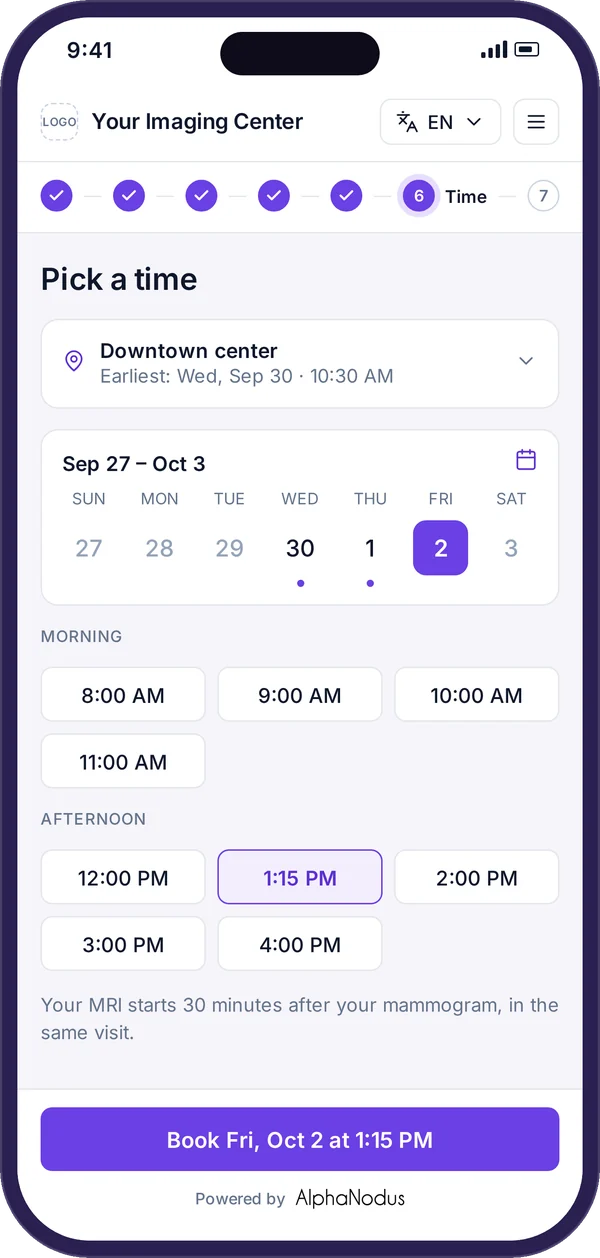
Gravity Visit on a phone: picking a time, with the earliest slot at the nearest location and a time grid

Incoming call

Gravity Imaging Center

Decline

Accept

Gravity Imaging Center

On the call · 1:12

AgentHi Alex, this is Gravity Imaging Center calling about the MRI Dr. Lee ordered. Can I help you book it?

AlexYes, but I need to check my work schedule first.

AgentNo problem. Before you go: do you have a pacemaker or any metal implants?

AlexNo.

AgentThanks, that’s noted. Call us back anytime and I’ll book it.

Calling…

Gravity Imaging Center

Gravity Imaging Center

On the call · 0:48

AgentThanks for calling Gravity Imaging Center. I can help you book the MRI Dr. Lee ordered.

AlexIs there anything next Tuesday morning?

AgentTuesday the 21st at 9:40 at Main Street is open. Shall I book it?

AlexYes, please.

AgentYou’re booked. I’ll text you the prep instructions.

Gravity Imaging Center

Text message · now

You’re booked: MRI knee, Tue 10/21 at 9:40 AM, Main Street, MR 2. Read your prep →

GV1001166 · MRI knee without contrast · Alex Rivera MR 2 · Main Street

Before the authorization lead time

Tue 10/14Thu 10/16Mon 10/20Tue 10/21Wed 10/22
8:00
9:40
11:20
1:00
Device
MR 2, built for the exam
Exam length
45-minute slot
Screening
Answered on the first call, kept on the patient
Other visits
No clash that day

Booked · Tue 10/21 · 9:40 AM

  1. 01

    A text comes in

    Once the order exists, the patient is texted or called to book, with a secure link straight to open slots, so the patient gets on the calendar.

    Patients book, move and cancel their own exam under the center’s booking rules: in the patient app, by voice with the AI voice agent, and by web chat.

    • Booking outreach Agentic

    Gravity Booking Gravity Visit

  2. 02

    The AI voice agent calls

    An AI voice agent calls patients to book new appointments, confirm and move them, reads prep instructions, asks screening questions and logs every call.

    Safety, contrast and women’s screening questions, answered once and kept on the patient, so nobody is booked in the wrong spot and nothing is on paper.

    • Self-booking by voice: AI voice agent Agentic

    Gravity Visit

  3. 03

    The patient calls back, and the agent books the right slot

    Every device, exam length, patient limit and gap checked on every booking, on a schedule built around each device, so the exam is booked right the first time.

    Slots too early for the authorization are greyed out, so no patient is booked before the payer is ready.

    • Confirmations and reminders Automated

    Gravity Booking Gravity Visit

03 · Authorized

Every exam that needs a prior authorization has one.

Authorized before arrival. The denial is fixed before it exists.

Prior authorization rules

Payer
Sample Health Plan · Commercial
Exam
MRI knee without contrast · CPT 73721
Rule
Prior authorization required

Authorization required

Booked: Tue 10/21 · 9:40 AMThe slot leaves the lead time for the authorization

Progress note · 10/09 · Jordan Lee, MD41-year-old woman with right knee pain and swelling after a fall six weeks ago. Six weeks of physical therapy and anti-inflammatories without relief. Positive McMurray test. X-ray 09/02: no fracture. Plan: MRI right knee without contrast.

The payer’s medical-necessity criteria

  • Symptoms and how long
  • Conservative treatment tried
  • Prior imaging

3 of 3 met · ready to submit

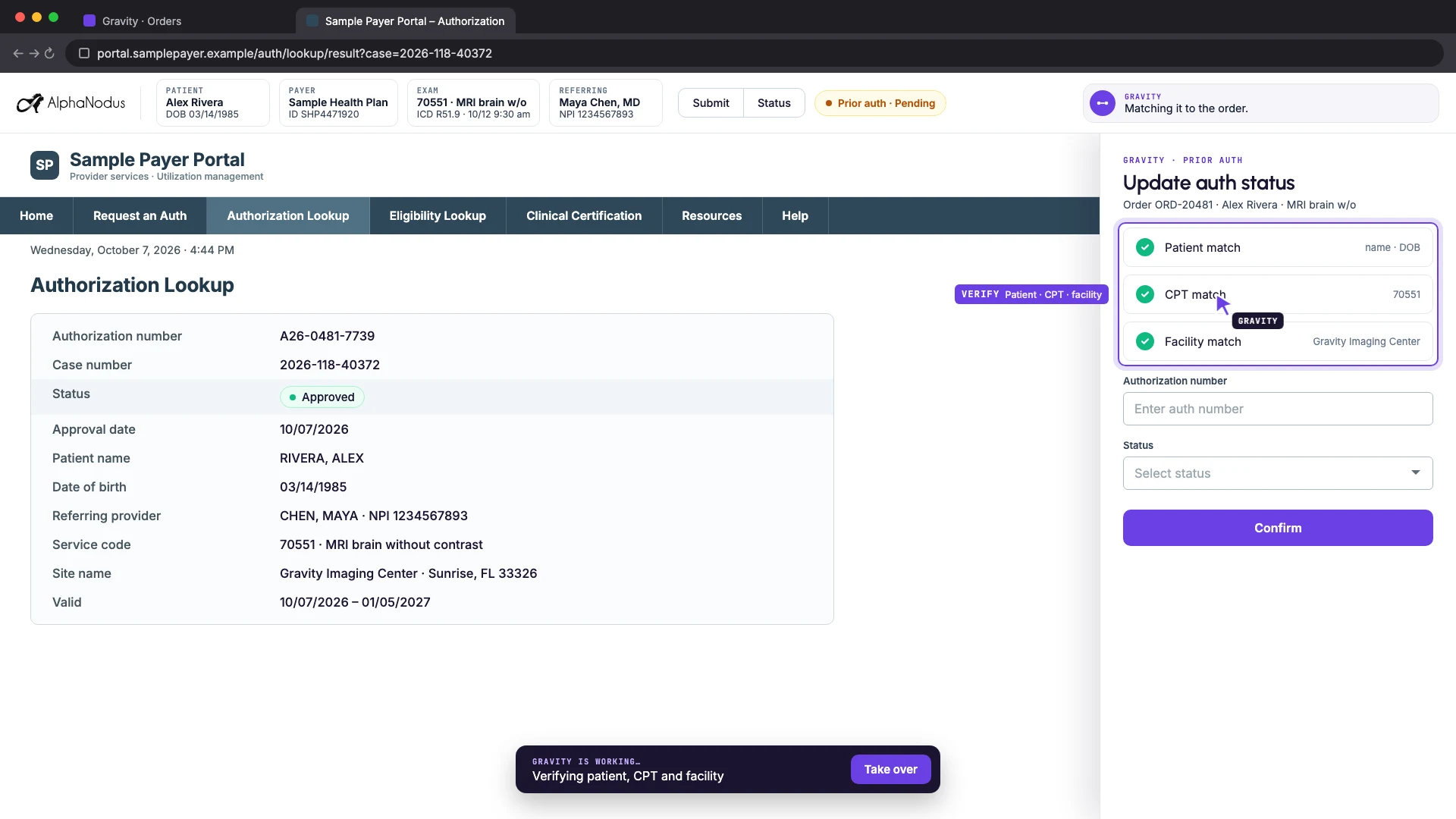
Gravity on a sample payer portal: the authorization lookup result beside the Gravity panel, where patient, CPT and facility each match the order before the authorization is recorded
Gravity’s agent checking an authorization on a payer portal and recording it on the order

GV1001166 · Prior authorization

Status
Approved
Auth number
A26-0481-7739
Valid
10/14 to 01/11
Booked
Tue 10/21, inside the authorized window
  1. 01

    Does it need one?

    Auth rules decide which exams need a prior authorization for each payer and code, with global and local rules, admin approval, verification and renewal.

    Per-insurance lead times grey out slots too early for authorization, waive once authorized, and flag moves outside the authorized window.

    • Prior auth status checks Automated

    Gravity PriorAuth Gravity Booking

  2. 02

    Medical necessity, checked first

    Before an authorization is requested, an agent checks the order and progress notes against the payer’s medical-necessity criteria, and flags what doesn’t meet them so it’s fixed before submission.

    • Medical necessity check Agentic

    Gravity PriorAuth

  3. 03

    The agent works the payer portal

    Authorizations submitted and tracked on payer portals without retyping the order.

    Stores each user’s portal logins in the extension so it can sign in to payer portals.

    • Submission and status on portals Agentic

    Gravity PriorAuth

  4. 04

    Approved, on the order

    One tab on the order holds every exam’s authorization details, status, number and dates, with pending and denied lists and manual updates.

    Coverage and authorization are fixed before the exam, not discovered after the claim.
Book a demo →

04 · Arrives ready

The patient arrives booked, prepared, checked in and paid.

Patients pay before they arrive, from their phone, with no login.

7:30

Monday, October 20

Messages · Gravity Imaging CenterReminder: MRI knee, Tue 10/21 at 9:40 AM, Main Street. Check in now, before you arrive: Check in →

Health history · 2 of 5

Have you had surgery on this knee?No

Do you have diabetes or kidney disease?No

MRI safety questionsAlready answered on 10/13, kept on your record.

Continue

Consents · 3 of 5

Consent to the MRII agree to the exam my doctor ordered.Signed by Alex Rivera · 10/20

Privacy noticeI have read how my information is used.Signed by Alex Rivera · 10/20

Continue

Estimate · 4 of 5

Sample Health PlanMember ID SHP4471920

Your estimated cost $376.20

Financial consentI understand this is an estimate and agree to pay my share of the final cost.Signed by Alex Rivera · 10/20

Pay $376.20 now

Checked in · 5 of 5

Paid $376.20Card ending 4242, on your visit.

You’re checked inSee you Tuesday at 9:40 AM at Main Street. Please arrive 15 minutes early.

GV1001166 · Check-in · Tue 10/21 · 9:40 AM

Reminder
Sent by text, with the check-in link
Health history
Filed to the order
MRI screening
On file from the first call
Consents
Signed: MRI, privacy
Estimate
$376.20, sent to the phone
Financial consent
Signed
Payment
$376.20, card, on the order

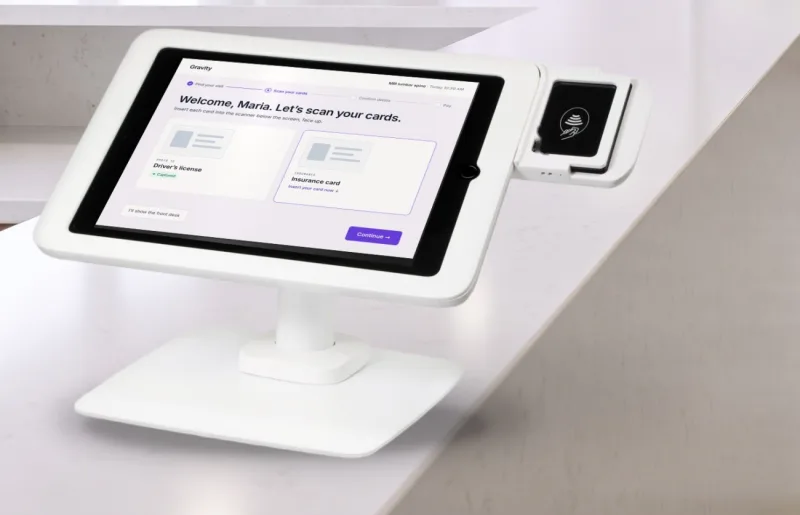
The Gravity Greeter check-in tablet on a lobby counter, asking the patient to scan their driver’s license and insurance cardOr at the lobby kiosk: Gravity Greeter

Checked in · ready for the exam

  1. 01

    The reminder, with a check-in link

    Patients get booking confirmations and appointment reminders by text or call, sent on a schedule, so the booked slot is kept and the patient arrives prepared.

    Before the visit, patients are sent a link to check in and upload the documents the center needs, on its own, ahead of the appointment.

    • Confirmations and reminders Automated
    • Pre check-in and document request links Automated

    Gravity Booking Gravity Visit

  2. 02

    Forms and consents, on the phone

    Every form is digital, from consents and e-signature to screening and health questionnaires, demographics, ID and insurance, and every signed copy and answer is filed to the order.

    Prep instructions linked to each exam are shared with patients automatically when they book, and read out by the voice agent.

    • Exam prep instructions Automated

    Gravity Visit

  3. 03

    The estimate and the financial consent

    Once coverage is known, the estimate is created and sent to the patient’s phone on its own, with no one building it.

    Accurate patient responsibility in one click, even when the payer sends dozens of competing benefit lines.

    • Patient estimates on their own Automated

    Gravity Estimate

  4. 04

    Paid and checked in, on the phone or the kiosk

    The patient’s share is collected at booking or at the visit, from the same screen as the estimate, with card payments straight onto the order.

    A tablet in the lobby, set up per location, lets patients find their appointment and check themselves in.

05 · Report back

The report and the images come back the minute the read is signed.

Lay letters, reports and images, on the patient’s phone.

2:16

Tuesday, October 21

Messages · Gravity Imaging CenterHi Alex, your MRI results are ready. Read your report and see your images: Open your results →

Your results · MRI knee

What this meansYour MRI shows a small tear in the cartilage of your right knee. Dr. Lee will talk with you about next steps.

Your images · 24SagittalCoronalAxial

Radiology report · MRI right knee without contrastFINDINGS: Tear of the posterior horn of the medial meniscus. No fracture. Ligaments intact.IMPRESSION: Medial meniscus tear.RECOMMENDATION: Orthopedic consultation.Signed 10/21 · 2:14 PM · Download the PDF

Outside Gravity · your RIS and PACS

  1. Scanned on MR 2 · 9:52 AM
  2. Read by the radiologist
  3. Report signed · 2:14 PM

Report received by interface · 2:14 PM

IMPRESSION: Tear of the posterior horn of the medial meniscus.

RECOMMENDATION: Orthopedic consultation.

Read for follow-up: no recall needed

GV1001166 · Report delivery

Fax
To Dr. Jordan Lee, (555) 010-0198, delivered
Referral portal
Report and images for Dr. Lee’s office
Patient
Text link: report, images, lay letter

Delivered · 2:15 PM

  1. 01

    The exam and the read, in your RIS and PACS

    It can run on top of the systems you already run.

  2. 02

    The signed report arrives, and is read for follow-up

    Reads the BI-RADS score and recommendation from the signed report, creates the follow-up order, sends the lay letter and recalls patients due for screening, on the schedule MQSA requires.

    • Breast tracking and recall Agentic

    Gravity Grow

  3. 03

    Back to the referring office, by fax and in the portal

    The signed report goes to the referring provider by fax on its own the moment it is signed, and again on amendment, branded and with every send on record.

    The finished report and the images for the referring provider’s patient, in the portal the minute the read is signed.

    • Report back to the referring office Automated

    Gravity Referral Gravity Communication

  4. 04

    And to the patient’s phone

    When the report is signed, the patient is sent a text link to read and download it, open shared images and read their lay letter in the portal.

    • Results and lay letters to the patient Automated

    Gravity Visit

Under every step

Every system you add is another place for work to leak.

  • Gravity Flow

    The engine that runs every flow in Gravity, automated or agentic, started by any event or a schedule, and the Flow Store of thousands of ready-made flows.

  • Gravity Work

    Puts each piece of work that needs a person in front of the right one.

  • Gravity Communication

    Voice, chat and document, built in: every call, text, fax and email lands on the order.

  • Gravity Trust

    Controls who can get in, what they can do, and records what was done.

Book a demo →

Questions

Questions about radiology workflow automation

How does Gravity run an imaging order?

Gravity gets the order, completes the exam and gets it paid. Where the work is routine, Gravity just does it. Where it takes intelligence, reading the fax, making the call, working the portal, Gravity’s agents do it, and your people either review the work or handle the exceptions.

Which steps are agentic?

Reading every document and creating the order, the order appropriateness check, financial clearance, booking outreach, the AI voice agent, portal eligibility checks, the medical necessity check, prior auth submission and status on payer portals, and breast tracking and recall. The rest, from reminders and check-in links to report delivery and remittance matching, is automated.

Can we review an agent’s work before it finishes?

Review first. Let it finish when you’re ready. Where a flow has a review setting, the center chooses: a person approves each run, or it finishes on its own. What an agent can’t finish lands on a worklist in Gravity Work, in front of the right person, with the history attached.

How do patients book, check in and pay?

Patients book themselves from the app or by chat, or the AI voice agent books them by phone, under the same rules your booking staff follow. Before the visit, patients confirm their details, answer screening questions, sign consents, upload documents and pay the copay or patient responsibility, all from one text link with no login.

Does Gravity read the scan or submit the claim?

We don’t read the scan. We make sure it gets back. The exam and the read happen in your RIS and PACS, and the claim goes out through your RCM. Gravity creates the charge items from the order, delivers the signed report and the images, and works the payer’s remittance when it comes back.

How does Gravity work with our RIS, PACS and RCM?

It can run on top of the systems you already run. Gravity is the Agentic Operations System (AOS) for your CRM, RIS and RCM. It gets the order, completes the exam and gets it paid, so no referral, no order and no revenue leaks away.

Alpha Nodus

Alpha Nodus builds the systems that make just-in-time care possible.

Watch one order go from referral to report to payment without anyone having to carry it.

Book a demo
1351 Sawgrass Corporate Parkway, Suite 104 Sunrise, FL 333231-888-625-7420info@alphanodus.com