Gravity Trust
Controls who can get in, what they can do, and records what was done.
With single sign-on, a change in your identity provider adds or removes the user in Gravity on its own.
Trusted by more than 460 imaging centers across the US.
Access and audit
Single sign-on, permissions and an audit trail for imaging centers
Set it up once: how your staff sign in, what each group can see and do, and the record of every change.
Single sign-on
Staff sign in with the work account they already have, and IT keeps control of access.
Staff sign in with their existing work accounts, so login security and password policy stay with the center’s IT team.
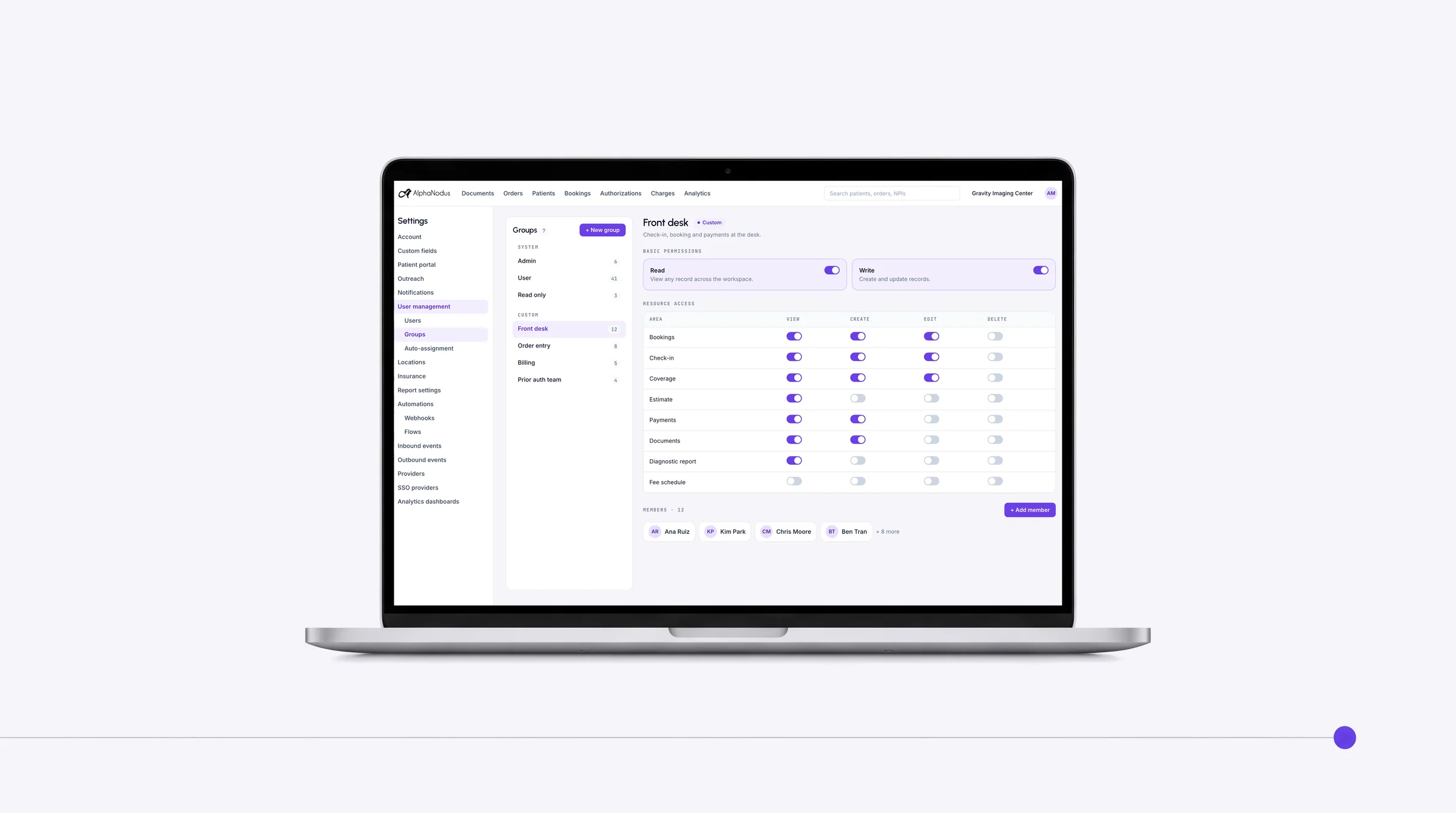
User groups and permissions
Each person sees and does only what their job needs.
Groups control which screens and actions each person has, from built-in User and Admin to job-specific groups.
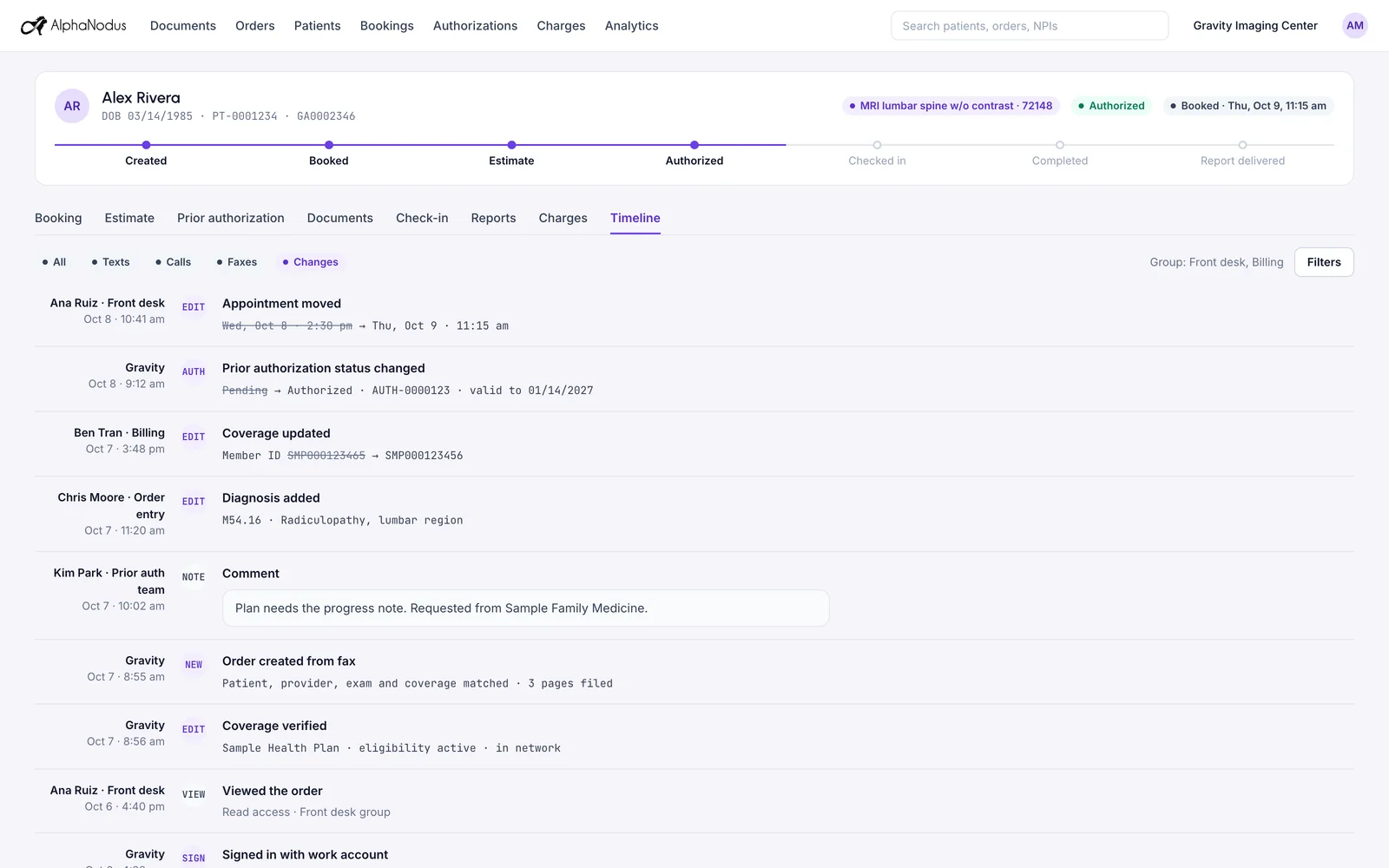
Audit timeline
Who changed what, and when, for every record, ready when an auditor asks.
Every record shows who changed which field, when, and from what to what, with a timeline report over any date range.
Order timeline
The whole story of an order on one screen, from first document to final report.
One timeline shows everything that happened to an order across appointments, coverage, prior auth, patient, documents and outreach.
Also built in
User management
With single sign-on, identity-provider changes add or remove users in Gravity on their own; otherwise admins add, update and remove users and reset passwords.
Works with
Everything that happens, on the record
Every conversation
Every call, text, fax, email and chat, and every opt-out, is kept on the order timeline: who, when, which channel and what came back.
Gravity CommunicationEvery flow run
Every flow run and every message, fax or report sent is logged with who, when and whether it went through, and what the agent did.
Gravity FlowEvery connection
API keys are managed by the center’s admins, and AI agents connect to Gravity through MCP, with every call permission-checked.
Gravity DeveloperOne cloud system for the work, on top of the systems you already run.
Questions
Questions about single sign-on, permissions and the audit trail
What is Gravity Trust?
Gravity Trust controls who can get in, what they can do, and records what was done. Staff sign in with the work account they already have through single sign-on, groups decide which screens and actions each person has, every record shows who changed which field and when, and each order keeps its whole history on one timeline.
What happens to my team?
Gravity takes over the tasks, not the people. The routine work completes on its own, so your team can give patients the attention the paperwork used to take.
Does Gravity support single sign-on?
Yes. Staff sign in with their existing work accounts through any SAML 2.0 identity provider, so login security and password policy stay with your IT team. With single sign-on, a change in your identity provider adds or removes the user in Gravity on its own. No user passwords are shared with Gravity, and your admins still decide who has access, whether each person is an Admin or a User, and when access ends.
Can we see who changed a record, and when?
Yes. Every record shows who changed which field, when, and from what to what, with a timeline report over any date range. Changes made by Gravity itself rather than a person are marked as made by the system.
What does the order timeline show?
Everything that happened to an order on one screen: appointments, coverage, prior auth, the patient, documents and outreach. Comments left on the order are part of the trail, and edits or deletions show up as their own entries.
Is the cloud safe for PHI?
Hosted on AWS in US regions only. A HIPAA Business Associate Agreement with every customer. Every sub-processor used in Gravity has a BAA with Alpha Nodus. Independently penetration-tested every year. Data encrypted at rest with per-tenant keys. MFA on every production login, SSO on Enterprise. Controls monitored continuously, with a public Trust Center.
Trust Center