Gravity Referral
Find the right imaging center, place the order in one step, and get the report back the day it’s signed.
Upload the order once. It becomes a digital order, with nothing to retype.
Trusted by more than 460 imaging centers across the US.
The office’s side of the order
A referring physician portal for imaging centers, with live order status
Watch every order move in real time.
Live order status
Watch every order move in real time, without calling the center.
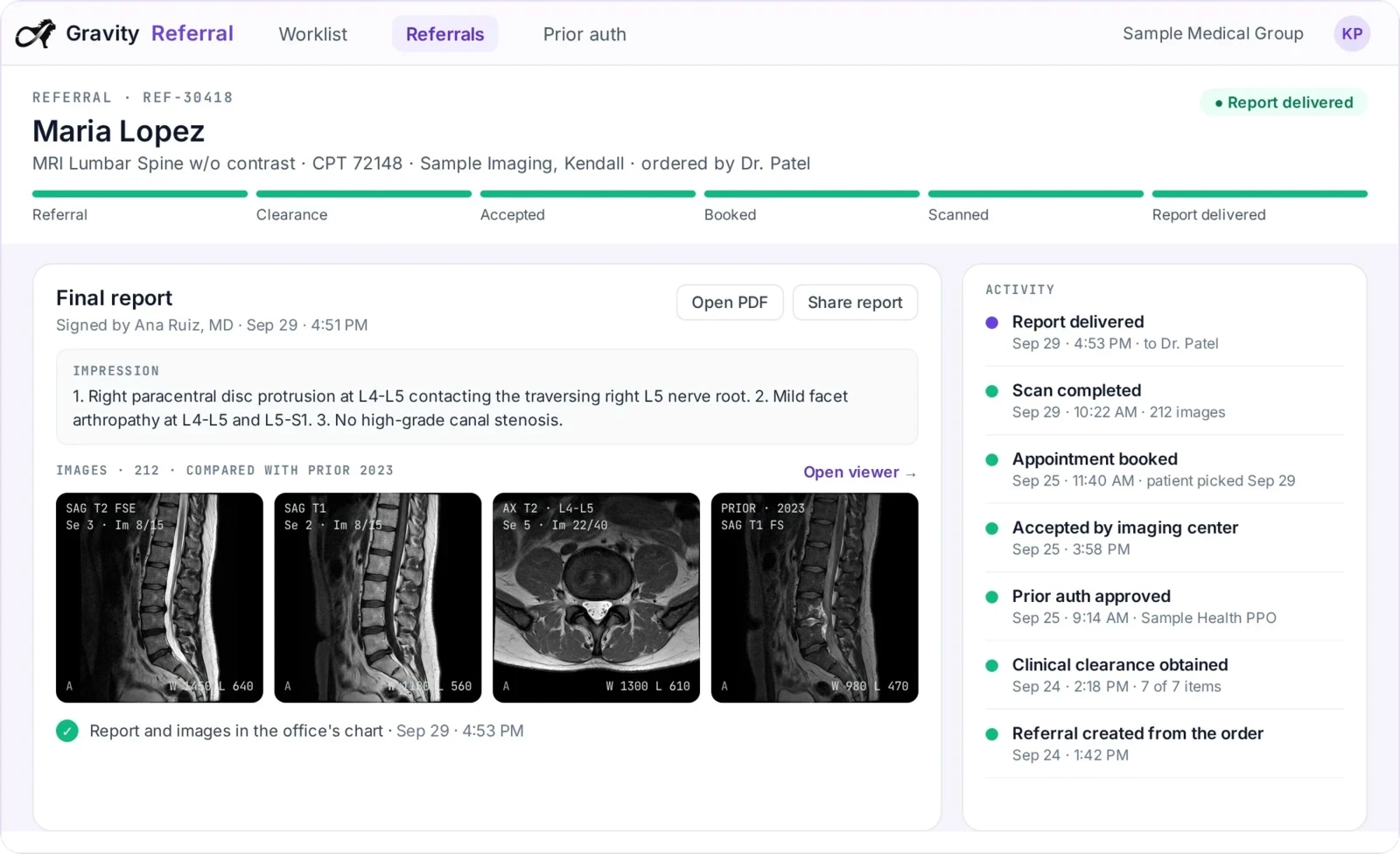
Every order’s status in real time: received, pending, needs information before it can be booked or completed, authorized, booked, completed.
Upload the order, get a digital order
Upload the order once. It becomes a digital order, with nothing to retype.
The referral coordinator uploads the order in the portal and it is read and turned into a digital order at the imaging center.
Told right away what the order needs
If something is missing, you’re told what and why, right away.
The office is alerted the moment an order needs clinical notes, an authorization or more information, and answers or uploads in the portal.
Reports and images in the portal
The report and the images come back the minute the read is signed.
The finished report and the images for the referring provider’s patient, in the portal the minute the read is signed.
Also built in
Authorization and clinicals gathered
The authorization and clinical notes an order needs are gathered for the office instead of being sent back to it.
Fax ordering
Offices that don’t use the portal keep faxing, and the order still becomes a digital order.
Imaging directory
Referring offices find which imaging centers near the patient offer the exam, and how soon.
In the Flow Store
Flows that get the report back
Each flow is one task your team did by hand, now run by Gravity. Install it from the Flow Store and it runs the same day.
Gravity does it
A flow, in its mode
The flows below: the signed report goes back to the office, and follow-ups and recalls go out, on their own.
The office does it
Through Gravity Referral
The office uploads the order once and watches it move. No mode: the office acts, not Gravity.
Your team does it
Only the exceptions
What a flow can’t finish lands on a worklist in Gravity Work, with the history attached.
An event or a schedule starts it, and fixed rules do it. Nothing to decide, so nothing to review.
An agent reads, decides and does the work. Where a flow has a review setting, you choose: Review first. Let it finish when you’re ready.
Gravity Referral’s flows
Report back to the referring office
The signed report goes to the referring provider by fax on its own the moment it is signed, and again on amendment, branded and with every send on record.
AutomatedStartsWhen the report is signed, and again on amendment
Exceptions go toReferring providers worklist
Also in the Flow Store, for this job
- Gravity Grow
Breast tracking and recall
Reads the BI-RADS score and recommendation from the signed report, creates the follow-up order, sends the lay letter and recalls patients due for screening, on the schedule MQSA requires.
AgenticStartsWhen the report is signed
Exceptions go toDocument and patients worklists
Works with
The center’s side of the same order
What the order still needs
Referring coordinators are told what the order still needs and what is delaying care.
Gravity PriorAuthThe report, by fax
Gravity Flow runs Referral’s flow: the signed report back to the referring office by fax, on sign-off and on amendment.
Gravity FlowEvery referral captured. Every report returned.
Questions
Questions about the referring physician portal
What is Gravity Referral?
Gravity Referral is the portal for referral coordinators at referring practices. Upload the order and it becomes a digital order; if it needs clinical notes, an authorization or more information, the office is told right away. Every order’s status is visible in real time, and the finished report and images are in the portal the minute the read is signed.
What happens to my team?
Gravity takes over the tasks, not the people. The routine work completes on its own, so your team can give patients the attention the paperwork used to take.
How does our office send an order?
Upload the order in the portal and it is read and turned into a digital order at the imaging center, with nothing to retype. Offices that don’t use the portal keep faxing, and the order still becomes a digital order.
Can we see where an order stands without calling the center?
Yes. Every order’s status is in the portal in real time: received, pending, needs information before it can be booked or completed, authorized, booked, completed. If something is missing, you’re told what and why.
When do we get the report?
The finished report and the images are in the portal the minute the read is signed. Offices not on the portal get the signed report by fax, and again if it is amended. We don’t read the scan. We make sure it gets back.
How is our data protected?
Hosted on AWS in US regions only. A HIPAA Business Associate Agreement with every customer. Every sub-processor used in Gravity has a BAA with Alpha Nodus. Independently penetration-tested every year. Data encrypted at rest with per-tenant keys. MFA on every production login, SSO on Enterprise. Controls monitored continuously, with a public Trust Center.
Trust Center